Log the Fingerprint, Not the Secret
21 Apr 2026When something goes wrong with your application’s configuration, you need to know what was loaded and where it came from.
Most tools for answering that question either tell you too much or nothing at all.
There’s a third option most people haven’t considered.
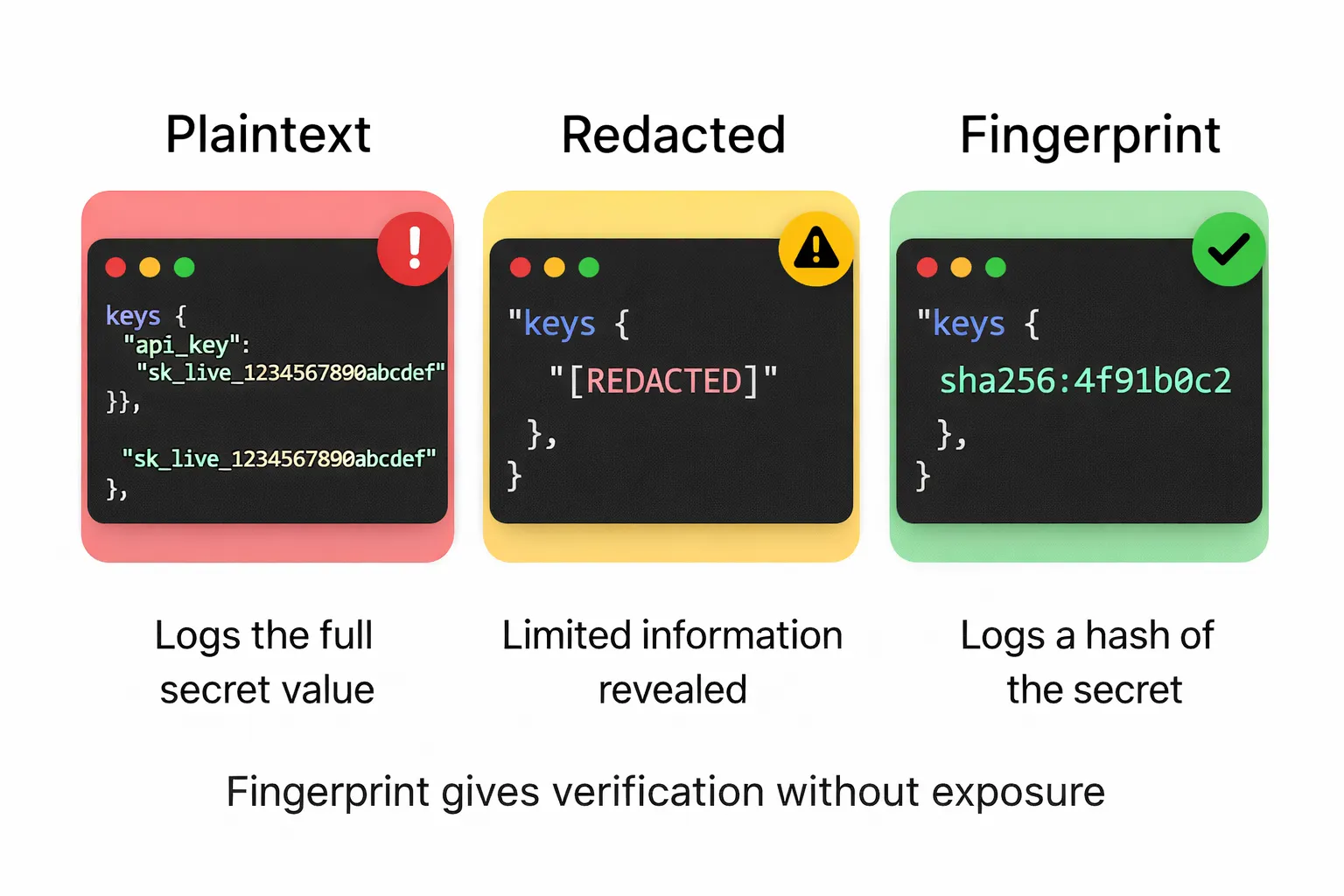
tl;dr: At startup, log SHA-256 fingerprints of secrets, not the secrets themselves. You can verify consistency and rotation without exposing credentials.
It’s 2 a.m. An alert fires… payment processing is down. Your first instinct is a credentials issue: something rotated, or didn’t rotate when it should have.
You need to know which secrets were loaded at startup, which resolver provided them, and whether the rotation propagated correctly.
Most config systems leave you with two choices:
Option A. Add debug logging. Print config values at startup so you can see what the application saw. The answer appears, and so do your database password and payment processor API key, now living in your log aggregator, possibly forwarded to a third-party service, accessible to anyone with log access. You’ve answered the debugging question by widening the blast radius.
Option B. Don’t log values. Fly blind. Redeploy, restart, check metrics, try to reason about what the application saw without being able to see it directly.
Neither is good.
The assumption underneath both options
To debug configuration, people assume they need to see the values. They usually don’t.
What you need to know in a debugging scenario:
- Did this variable resolve at all?
- Which resolver provided it (
.env,process.env, AWS Secrets Manager)? - Did the rotation work? Is the value different from what it was yesterday?
- Is every pod seeing the same value?
None of those questions require seeing the plaintext value. They require an identity signal: something that lets you verify whether a value is present, correct, and consistent without being the value itself.
A cryptographic fingerprint is that signal.
For very low-entropy values (e.g., a boolean flag, a small integer timeout, a known environment name like production), a SHA-256 fingerprint can be brute-forced by an attacker who guesses the few possible inputs.
In those cases, prefer length or none over fingerprint. For high-entropy secrets (API keys, passwords, tokens), fingerprinting is safe.
A common middle ground is redaction: logging [REDACTED] in place of the value. That tells you a value existed, but nothing else: not whether it changed, not whether pods are consistent.
Redaction hides the secret but gives you no verification signal. Fingerprints give you both.
What fingerprints give you
A short SHA-256 fingerprint usually gives you enough signal to debug an incident without exposing the secret itself.
If DATABASE_URL produces fingerprint sha256:4f91b0c2 across all your pods, the value is consistent. If one pod shows sha256:4f91b0c2 and another shows sha256:94e1b7aa, something is wrong and you’ve located it without printing either credential. If after rotating a secret the fingerprint changes from sha256:4f91b0c2 to sha256:7a3c9f11, the rotation propagated. If it didn’t change, it didn’t.
Truncating the hash to eight hex characters leaves about 4 billion possible values. For a handful of config keys per service, the chance of two different secrets producing the same prefix is negligible.
The prefix is for operational convenience (short log lines, easy to grep), not a security boundary, and the full hash is available if you ever need it.
The sha256: prefix is part of the fingerprint string by convention, which leaves room for a stronger algorithm later (say sha512: or blake3:) without breaking consumers that parse the prefix.
What safe debug output looks like
In any language, the pattern is the same: compute a SHA-256 fingerprint, log it with metadata like key and source, then discard the plaintext. Here’s how it looks with node-env-resolver:
import { resolveAsync } from 'node-env-resolver';
import { postgres, string } from 'node-env-resolver/validators';
import { awsSecretHandler } from 'node-env-resolver-aws';

const debugEntries = [];

const config = await resolveAsync({
  schema: {
    DATABASE_URL: postgres(),
    STRIPE_SECRET_KEY: string(),
  },
  references: {
    handlers: {
      'aws-sm': awsSecretHandler,
    },
  },
  options: {
    debug: {
      enabled: true,
      valueMode: 'fingerprint',
      includeSource: true,
      onDebugEntry: (entry) => debugEntries.push(entry),
    },
  },
});

logger.info({ event: 'config_loaded', entries: debugEntries }, 'Config loaded');
Each entry looks like this:
{
  "key": "DATABASE_URL",
  "resolved": true,
  "source": "process.env",
  "reference": "aws-sm://prod/app/database_url",
  "resolvedVia": "aws-sm",
  "sensitive": true,
  "length": 53,
  "fingerprint": "sha256:d0976d8b",
  "preview": null
}
No plaintext. No partial reveal. Source, provenance, fingerprint. These answer most of the questions you have during an incident.
The reference and resolvedVia fields show the full chain: the reference string loaded from process.env, the handler (aws-sm) that dereferenced it, and the resulting fingerprint of the final value.
Incident response in practice
Back in the 2 a.m. scenario. You pull the config snapshot from your log aggregator:
jq -r '.entries[] | "\(.key) \(.fingerprint // "none") \(.resolvedVia // .source)"' config-snapshot-*.json | sortDATABASE_URL sha256:4f91b0c2 aws-sm
STRIPE_SECRET_KEY sha256:7a3c9f11 aws-smAcross all pods, the fingerprints are consistent and the sources are correct.
Check whether the rotation propagated:
# yesterday
DATABASE_URL sha256:e2d9a1c3 aws-sm

# tonight
DATABASE_URL sha256:4f91b0c2 aws-sm
Fingerprint changed. Rotation worked. Confirmed in thirty seconds, from logs.
Post-incident rotations are this scenario at scale. After the Vercel April 2026 security incident, affected customers were asked to rotate any credentials stored as non-sensitive environment variables. That means dozens of secrets rotated under time pressure, each requiring confirmation that every pod picked up the new value. Fingerprint logs turn that confirmation into a diff; without them, you’re trusting that rotation worked.
The four visibility modes
The debug system supports four modes:
| Mode | What it shows | When to use |
|---|---|---|
none |
Key, resolved state, source | Default production logging |
length |
Above + value length | Minimal leak risk, basic verification |
fingerprint |
Above + SHA-256 hash, length | Incident response, rotation verification |
masked |
Partial preview (first/last chars) | Never in production, only for local troubleshooting |
For production incident diagnostics, fingerprint is often the most useful choice for high-entropy secrets. Stricter environments may prefer none by default and only turn on fingerprinting during an incident. length sits between them when you want the lowest possible leak surface and only need to confirm a value was loaded. masked exists for local development only: a partial reveal like sk_live_...4f91 still leaks information and should never appear in production logs.
For hard masking of values that slip into console logs or HTTP responses, libraries like node-env-resolver’s protect() replace sensitive values with [REDACTED] at the output boundary: a different tool, for a different job.
Log once, at startup
Log the snapshot once when config loads. The goal is a startup audit trail, not request-level logging.
// At startup, after resolve():
logger.info(
  {
    event: 'config_loaded',
    service: process.env.SERVICE_NAME,
    entries: debugEntries,
  },
  'Config loaded successfully',
);
Store these in a place your security team can access during an incident, such as a separate log stream or dedicated audit index that won’t get mixed in with noisy application logs and rolled off before anyone needs it.
The principle
The assumption that you need to see a value to know it’s correct is wrong. A fingerprint tells you whether a value is present, whether it is consistent across instances, and whether it has changed.
Observability and security don’t have to conflict. The tension comes from bad tooling. With identity signals, you can verify configuration state without exposing the values themselves.
If a secret ends up in your logs, your incident response just created a new incident.
Fingerprints let you answer the question without creating the problem.