UX in 2026 reaches past the screen
04 Nov 2026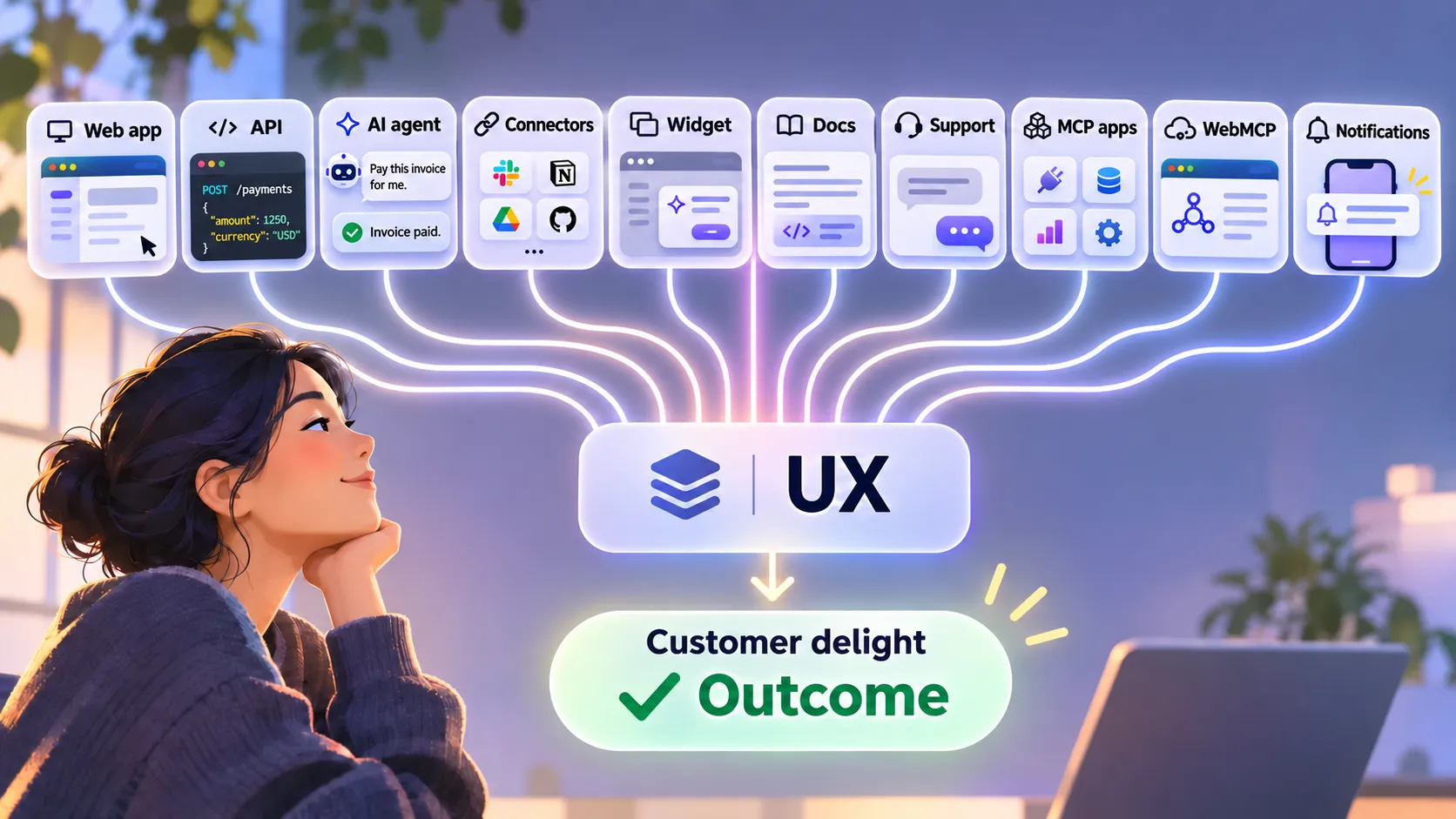
Customers reach you through your web app, API, AI agents, connectors, widgets in partner apps, docs and support. You reach them through notifications. Hire UX people who can understand and influence all of it.
Start with the outcome
When a company hires for UX, I suspect the hiring manager pictures the web application: the components, the design system, the colours, the accessibility, the layouts and how they fit together.
That work matters. I see it as one part of the job.
In 2026 I think we need to rethink what we hire UX professionals to do. Depending on your business, a growing share of your customers may reach you through APIs, AI agents, protocols such as MCP and widgets inside other companies’ products.
UX is about helping someone reach the outcome they came for with as little effort as possible. The experience should feel continuous and consistent. The language should make sense to them. At its best, the person feels you built the system for what they need.
That’s what I mean by customer delight. I don’t mean clever animations or beautiful components. I mean the moment a customer notices that everything worked.
Don Norman and Jakob Nielsen made the same argument in their 1998 definition of user experience. UX has covered more than the interface for decades. The number of ways a customer can reach your company has grown.
APIs are user interfaces too
Engineers have designed most APIs. We choose the endpoints, parameters, schemas, authentication, error responses and overall structure, and each of those choices shapes someone’s experience.
Ask the questions a UX designer would ask of a screen. Can a developer see how to perform an action? Can they tell required fields from optional ones? Do the names follow one pattern? Do the errors tell them what to fix? Can they finish their task in a few calls, or do they have to learn your internal systems first?
Google Cloud makes this point in its article on RESTful API design best practices:
“Well designed APIs make it easy for consumer developers to find, explore, access, and use them.”
I’d call that UX. A developer uses your API as an interface even though they never click a button.
Stripe has treated APIs this way for years. In The first 10 years of Stripe’s payments APIs, the team puts it in one line:
“An API product is more than just the API”
The post goes on to show how documentation, tutorials, debugging tools, support and dashboards shaped the experience of integrating with Stripe.
I want UX professionals in those conversations. They don’t need to decide implementation details. They need to ask whether the design makes sense to the people who will use it.
Your customer might arrive through an AI agent
Some customers now have another route to your business. Instead of logging in and clicking through screens, they ask an AI assistant to do the job for them. The assistant’s MCP client connects to your MCP server, discovers the tools it exposes and invokes them. Those tools may then call your API.
How well the agent uses those tools now shapes your customer’s experience. You can ask the same design questions of an agent’s journey:
- Can the agent find the tools, and do their names and descriptions make sense?
- Are the inputs and outputs defined well enough for the agent to choose the right action?
- Does authentication work without weakening security, and can the customer understand what they’re authorising?
- Does the system ask for confirmation before an action with serious consequences?
- Can the agent recover when something fails, and can you tell whether customers’ tasks completed?
A tool that works when you call it by hand can still fail your customer if the agent picks the wrong tool or fills in the wrong arguments. Anthropic’s research in Writing effective tools for AI agents shows that tool names, descriptions and returned context change whether agents complete their tasks, and it recommends evaluating tools against realistic tasks to find out. I wrote about testing these tools in Test WebMCP tools like an API.
Most developers don’t design for this yet. Of the developers who answered the 2025 Postman State of the API report, only 24% said they design APIs with AI agents in mind. Stripe’s 2026 developer keynote covered making APIs readable to agents, with predictable actions, verification and human control. In one demo, an agent tries a refund above an approval threshold, receives a structured error and asks a human to approve it.
So we’re building new combinations of conversations, tools and interfaces, alongside the web apps we already have. Your customer may never see the API or MCP tool that handled their request, but they will feel it when it fails. Design that experience on purpose.
Your product lives inside other people’s apps
Customers also meet you in products you don’t own. They add your connector to their AI assistant, install your app in Slack or use your widget in a partner’s dashboard. Break your product into pieces other teams can compose and customers can get value from you without opening your app. You also give up control of the page around you.
A connector starts with a setup journey, and you design most of it. Your customer reads your directory listing, signs in, approves a list of permissions and tries a first task. Claude’s guide to connectors tells people to review the access a service requests, so write that request in words they can judge.
Widgets go further and put your interface on someone else’s page. Stripe’s Connect embedded components let a platform add Stripe’s payments UI to its own dashboard and adjust the appearance to match its brand. The components inherit their font and background colour from the page around them, and when a component needs authentication, it opens a Stripe popup the platform can’t remove. Your team has to make the same call: which parts can a host change, and which stay yours?
MCP Apps bring this to AI conversations. A tool can return an interactive interface, and a host such as Claude or ChatGPT renders it in a sandboxed iframe.
Ask these questions of any surface you don’t control:
- Does your widget still make sense in the host’s theme, at the width they give it?
- Do your labels match the host’s words, or will the customer meet two names for one thing?
- Can the customer tell who they’re dealing with, and who to contact when it fails?
- Can they see what they connected, and revoke it?
When your widget fails inside a partner’s dashboard, the customer will probably call the partner. Agree who handles what before launch, and give both support teams the same correlation ID.
One journey, many touchpoints
Picture a customer who asks their AI assistant to pay a supplier’s invoice.
The assistant’s MCP client lists the tools on your server and picks create_payment. Your customer sees a consent screen and has to decide whether “manage payments” covers what they asked for. The tool calls your payments API, which rejects the request because the supplier’s account needs verifying. The agent can only help the customer if the response body says what failed and what to do next, so return a structured error with a code such as supplier_verification_required, a readable message and a link to the verification step. Suppose your API gets this right and the agent passes the link on. The customer follows it to a verification page that asks for a “business registration number” without saying which one. They search your docs, find a page that still describes last year’s form, and contact support.
Your support colleague needs enough of the trail to help: a correlation ID, the relevant audit events, the permissions the customer granted and a sanitised copy of the error. They don’t need the customer’s whole conversation with the assistant or any credentials. Decide what support can see, and record it, before the first ticket arrives. I covered that recording in You Can’t Support What You Didn’t Record. If your colleague can’t see the trail, the customer explains everything again.
Your colleague clears the verification the next morning. By then the customer has left the conversation, so a notification has to finish the job. “Acme is verified. Approve your £4,200 payment” lets them act from their phone. “Your account has been updated” sends them back to support.
The customer experienced one task: paying an invoice. Your company delivered it through an assistant integration, a consent flow, an API, documentation, a support desk and a notification. Every weak point in that chain landed on the same person.
Documentation is UX
When someone tries to learn your product, your documentation becomes part of their journey.
Check it the way you’d check a screen. Are the examples correct? Do the screenshots match the current application? Do the videos show how the product works today? Can a reader find what they need?
Check the words too. If your application calls a concept a payment, your API calls the same concept a transaction and your docs use a third term, you’ve handed the customer a puzzle. Different concepts can deserve different names. In payments, a payment and a transaction often mean different things, and your customers need to know which is which. Domain-Driven Design calls the fix a ubiquitous language: a shared, unambiguous vocabulary for the domain that customers recognise, used in the product, the APIs, the docs and by the people who support them.
Readers come to docs for different reasons. A newcomer learning the product needs something different from an experienced developer checking a reference. The Diátaxis documentation framework gives you a way to design for each of those needs, and I used a similar idea in One Folder, One Topic.
If you give an agent access to your docs, it may decide which action to take based on what they say. A wrong example then costs more than it used to.
Design, maintain and test your documentation alongside the product. Don’t leave it until the application ships.
Customer support is UX too
Some practitioners would file support and customer communication under customer experience (CX) or service design, and they have a point. I’m arguing that UX thinking should cross those lines, whatever label your org gives each discipline.
A customer who gets stuck raises a support request. From that moment, your response matters more to them than your interface does.
Did you acknowledge the request? Does the customer know what’s happening and when they’ll hear back? Did your answer solve the problem?
You have to prioritise, but a customer with a small problem should still feel you took them seriously.
The GOV.UK Service Standard expects services to work across channels and asks designers and researchers to work with frontline operations teams.
A well designed application can’t make up for a bad experience when something breaks. Customers often judge you more on how you handled the problem than on everything that worked before it.
Communication is part of the experience
Think about how you announce a new feature, a significant API change or a change in how the product behaves.
Does the announcement explain why the change matters to customers, or does it describe the implementation? Does it tell them what to do? Can they spot the breaking changes? Does it reach the people who need it?
Your technical blog, product announcements, release notes and changelog each give you a chance to improve the experience. Stripe redesigned its API changelog so developers could see which changes affected them and how to upgrade, instead of reading a list. That’s UX thinking applied outside the application, and it makes the customer’s next step obvious.
Notifications need the same care, because they reach people in the middle of something else. Nielsen Norman Group says so in Five Mistakes in Designing Mobile Push Notifications:
“Any notification amounts to an interruption”
Agents give you more reasons to interrupt. An agent working in the background has to tell your customer when it finishes, gets stuck or needs approval, so treat each of those messages as a step in the task. Can the customer understand it on a lock screen? Can they act on it there, and does an approval stay as safe as it would in your app? Can they turn off marketing without losing payment alerts? If you send too many, customers switch you off, and your agent’s next approval request goes nowhere.
What to look for when you hire
I’m not suggesting one UX designer should own API engineering, support operations, documentation and company announcements. Those areas need clear owners and specialist skills.
I do expect UX professionals, and senior ones above all, to understand and influence these wider experiences. In an interview I’d ask how a candidate approaches a whole customer journey:
- Can they spot inconsistencies between touchpoints?
- Can they work with engineers on API design and on experiences delivered through AI agents?
- Do they understand how docs and support affect a customer’s ability to finish a task?
- Can they design for surfaces they don’t control, such as a widget in a partner’s app or a notification on a lock screen?
- Do they look for evidence that customers succeeded, or mostly at how an interface looks?
Good answers to questions are cheap, so I’d also ask for stories from their past work. I’d want to hear about a time they:
- sat with engineers and cut the number of steps in an integration
- rewrote documentation after watching customers struggle with it
- traced a complaint across product and support and got both teams to fix their part
- agreed with a partner team how an embedded feature should look, behave and fail
Confidentiality means plenty of strong candidates can only show screens in public. Ask them to walk you through the journey behind those screens: the decisions they made, who they worked with and what changed for customers.
I’d also ask how they measure the experience. Operational measures tell you where a journey breaks. Outcome measures tell you whether the customer got what they came for:
| Channel | Operational measures | Customer outcome |
|---|---|---|
| Web application | Accessibility, effort, error rates | Task completed without help |
| API | Time to first working call, rate of malformed requests | Integration live and working in production |
| MCP integration | Tool discovery, correct tool selection, authorisation prompts shown | Task completed end to end, and how often the customer had to step in or undo a mistake |
| Connector or widget | Setup completion, load failures in host apps, connections revoked | Task completed inside the host app without a trip to yours |
| Notifications | Opt-outs, actions taken from the notification | Customer acted in time without opening your app to check |
| Support | Response times, escalations | Problem resolved without the customer repeating themselves |
I’ve simplified the table. Accessibility, reliability and safety matter as outcomes in their own right, and a task that completes at the cost of any of them has failed. Still, a candidate who looks at both columns is answering the question that matters: are we helping customers do what they came to us to do?
UX, engineering, product, documentation, support and customer-facing teams have to work together to answer it, and no one person can deliver the whole experience. Someone still needs to look at that experience end to end.
Follow the customer
Your customers never cared about the boundaries between your web application, your API, your AI integrations, your partners’ apps and your support team. A customer doesn’t care whether a React app, an API call, an MCP tool, an embedded widget or a person in support completed their request. They care that it worked, that they understood what happened and that they can trust the result.
When you hire for UX in 2026, ask whether the candidate can design an excellent application. Then ask whether they can help you deliver an excellent experience however the customer chooses to reach you.
Your customer experiences your company, not your org chart.